
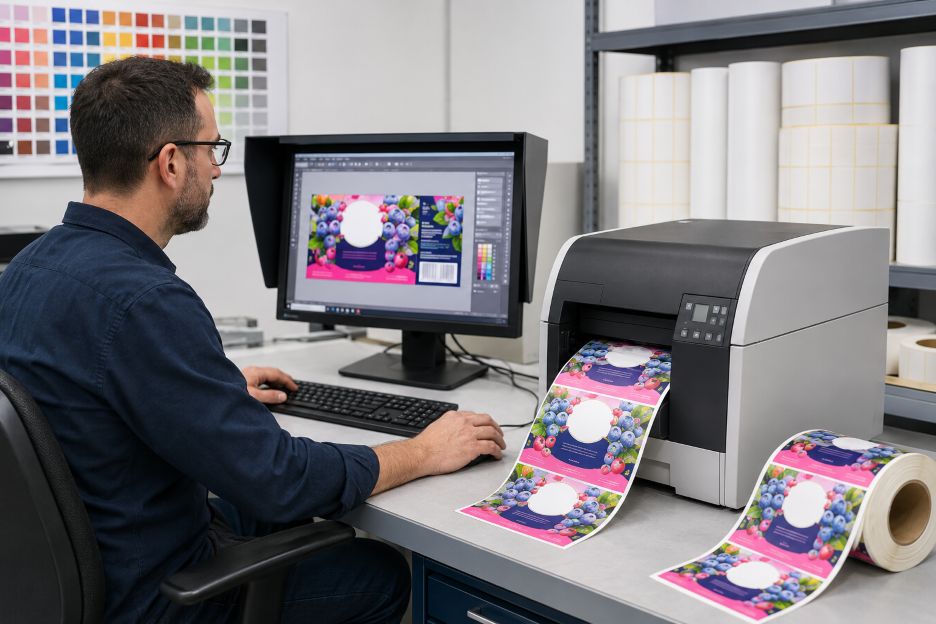
Color inkjet printing creates images by placing controlled droplets of liquid ink onto a surface. A label can look polished on a calibrated monitor yet print with shifted color, soft text, or misplaced edges when the file, driver, printer, and stock interpret the job differently.
printable inkjet labels form the physical endpoint of a digital process. The design side defines what should appear, while the hardware side determines what can appear on a particular material. Neither half can deliver reliable output alone. Clean, repeatable results come from matching their settings and limitations before a full run begins.
The Software Side Defines the Intended Result
Layout software establishes label dimensions, margins, image placement, type size, and bleed. The document size should match the finished label, and important content should remain inside a safe area so normal cutting or feeding variation does not trim it. Images also need enough effective resolution. Enlarging a small raster image spreads its available pixels across more space, which can make edges appear soft.
Color requires another translation. Monitors create color with emitted red, green, and blue light, while most color printers build an image with deposited inks. The International Color Consortium explains that ICC profiles describe the relationship between device values and a standard color space. A suitable profile helps software convert color for a specific printer, ink set, and medium instead of sending the same values blindly to every device.
That conversion has limits. A screen may display colors that a given ink-and-stock combination cannot reproduce. Color-management software maps those colors into the printer’s available gamut, and the selected rendering method affects the compromise. A profile therefore improves predictability, but it cannot expand the physical range of the printer. A small proof remains the practical check for brand colors, photographs, and subtle gradients.
Variable data adds a different software challenge. Names, barcodes, serial numbers, prices, or images may change from one label to the next. Adobe documents how Data Merge combines a fixed layout with CSV or TXT records to produce many versions. Before printing, operators should preview the longest entries, missing fields, and unusual characters because a technically valid merge can still create overflow or awkward line breaks.
The Hardware Side Determines What Reaches the Stock
The print engine turns processed image data into timed droplet placement. Printheads contain nozzles that eject liquid ink in controlled patterns. HP describes inkjet systems as directing tiny droplets through printhead nozzles to form text and images. Nozzle condition, alignment, print resolution, and carriage or web movement all influence sharpness and banding.
Ink chemistry must also suit the label face material and intended use. Dye and pigment formulations interact differently with coated paper and synthetic film, affecting drying, color appearance, and resistance to handling. Compatibility matters more than a claim that one ink category is always better. Printer manufacturers and media suppliers typically qualify particular combinations because coating controls how quickly droplets settle, spread, and dry.
Media handling completes the physical equation. A printer must recognize label width, gap or mark position, thickness, and feed direction. Roll guides that are too loose can allow sideways movement, while an incorrect sensor mode may place one image across two labels. Epson notes that its media-type setting tells the printer what material is loaded and adjusts ink coverage accordingly. That setting can change output even when the design file stays identical.
Alignment Produces a Usable Label
The comparison between AI-generated and human-created outlines offers a useful parallel: automation proposes structure, while skilled people resolve important practical context. The file should use the page size, color profile, resolution, and variable-data rules. The driver should match the medium and quality level. The printer needs suitable ink, clean nozzles, accurate calibration, and stable feeding.
A controlled test is the safest bridge between them. Print several representative labels. Check registration, small type, barcode clarity, drying, and rub resistance under the actual viewing and handling conditions. If corrections are needed, change one variable at a time and record the approved file, profile, driver preset, ink, and media combination.
Where Mismatches Usually Appear
Most quality problems reveal the layer that is out of alignment. Unexpected color often points to a missing, wrong, or duplicated profile. Bleeding and slow drying suggest excessive ink or incompatible coating. Blurry artwork may come from low source resolution, while repeated stripes can indicate clogged nozzles or alignment trouble. Image drift usually leads back to page dimensions, sensors, guides, or feed calibration.
Reliable color label production is therefore less about choosing software over hardware than building a repeatable connection between them. As designs become more personalized and production runs change more frequently, documented presets and short proofs will remain valuable. The best printed result is the one whose digital intent has been translated for the exact machine, ink, and label stock in use.